
Agents and Slack
Zuse in Slack
Install Zuse in Slack and tag @Zuse in any channel or thread to see who is licensed near your hospital, check a license, and get background and intro notes.
Bring Zuse into your team's Slack. Tag @Zuse in any channel or thread with what you are looking for: the licensed vets and techs near a ZIP code, whether someone holds a license, or what to say to a person before you contact them. Zuse reads the board record and replies in the thread with a table you can page through.
Get started
Installation
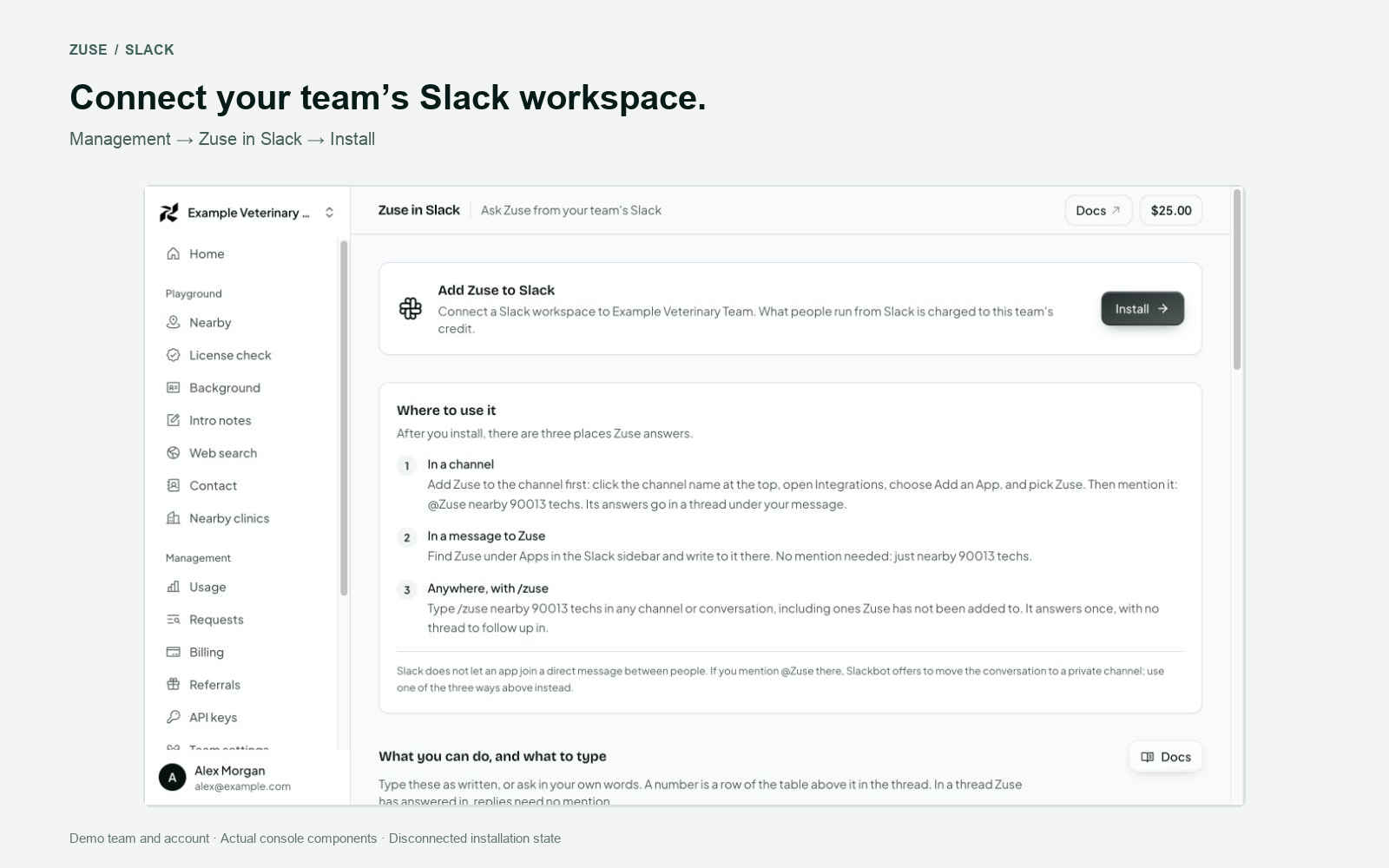
- In the Zuse console, go to Management > Zuse in Slack, then click Install. You need to be an owner or admin of the team.
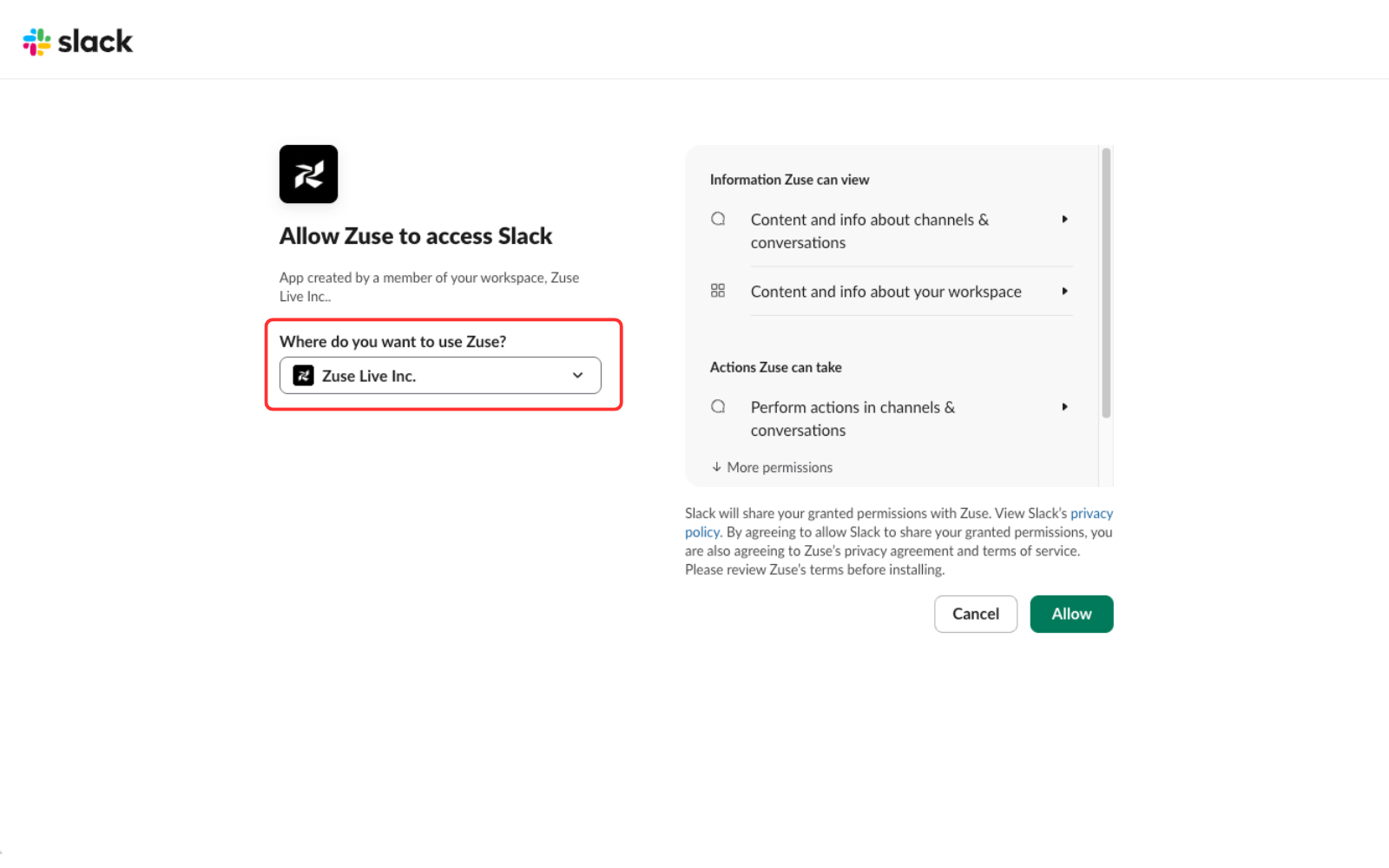
- Slack's approval screen opens. Pick the workspace you want Zuse in, then click Allow.
- Once installed, add Zuse to a channel or message it directly, and start asking.
Where you can use it
There are three places Zuse answers:
| Where | How |
|---|---|
| In a channel | Add Zuse to the channel first: click the channel name at the top, open Integrations, choose Add an App, and pick Zuse. (Typing /invite @Zuse in the channel does the same.) Then mention it: @Zuse nearby 90013 techs. |
| In a message to Zuse | Find Zuse under Apps in the Slack sidebar and write to it there. No mention needed. |
Anywhere, with /zuse | /zuse nearby 90013 techs works in any channel or conversation, including ones Zuse has not been added to. |
Slack does not let an app join a direct message between people, and /invite does not work there. If you mention @Zuse in one, Slackbot offers to move the conversation to a private channel. Use one of the three ways above instead.
How to use Zuse from Slack
In any channel Zuse has been added to, mention @Zuse with what you want:
@Zuse who are the licensed techs within 10 miles of 90013?Zuse replies in a thread under your message.
You can ask in your own words or use the short form (@Zuse nearby 90013 techs 10mi). Either way, Zuse does four things:
| Ask for | What you get |
|---|---|
| Nearby | Who is licensed near a ZIP code: vets, techs, assistants, or vets and techs together. Ten miles unless you give a distance, 50 at most. |
| License check | One person's license: type, number, status, expiry, and anything the board has flagged, with a link to the board's own lookup. |
| Background | Where a person works, their education, and public contact details, from the public web. |
| Intro notes | What has changed for a person lately, and what to say in a first message. |
Zuse needs a ZIP code for a place and a name for a person, and it never guesses either. It does not chat or answer general questions. When a message is not one of these four, it says so.
Follow-ups
Once Zuse has answered in a thread, just reply in that thread to continue. No need to mention @Zuse again. Zuse remembers the list it showed, so a follow-up can point at a row by its number. Anyone in the thread can follow up.
background 3Press Next under a table, or reply more, for the following page.
Zuse only acts on a plain reply when it is unmistakably meant for it: more, a keyword with a row number, or a search with a ZIP code. Everything else in the thread is your team talking, and Zuse stays out of it. To ask about someone by name inside a thread, mention @Zuse.
Direct messages
You can also message Zuse directly in a DM. No mention is needed there at all. Each message you send starts a new request, answered in a thread under that message. Reply in the thread to continue.
This means a DM with Zuse itself, under Apps in the Slack sidebar, not a direct message between people. The first time you open it, Zuse says hello with a few things to try.
The /zuse command
/zuse nearby 90013 techs works in any channel, including ones Zuse has not been invited to. It answers once, and has no thread to follow up in.
Who sees the answer
Nearby and License check answers are public record, and are posted in the thread for everyone there.
Background and Intro notes can include contact details. In a channel they are shown only to the person who asked. In a DM they are simply the reply.
Examples
The screenshots use illustrative details: names, locations, license identifiers and personal information have been replaced. The examples shown were captured in direct-message threads with Zuse.
Who is licensed near a hospital
Ask with a ZIP code. Zuse answers with how many there are, a numbered table of the nearest ten, and a Next button.
@Zuse nearby 90013 techs 10mi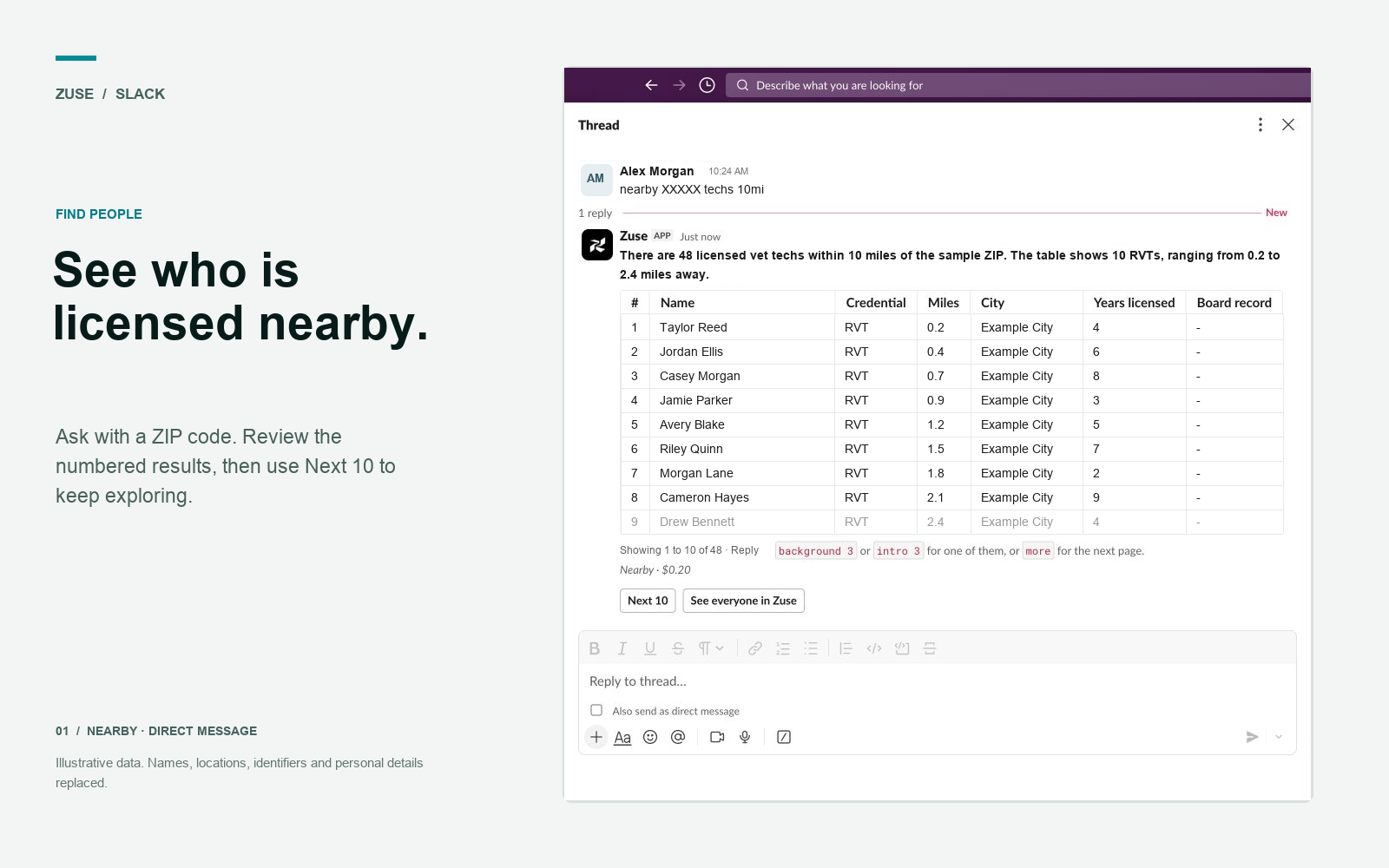
Check a license
@Zuse is Jane Doe licensed in CA?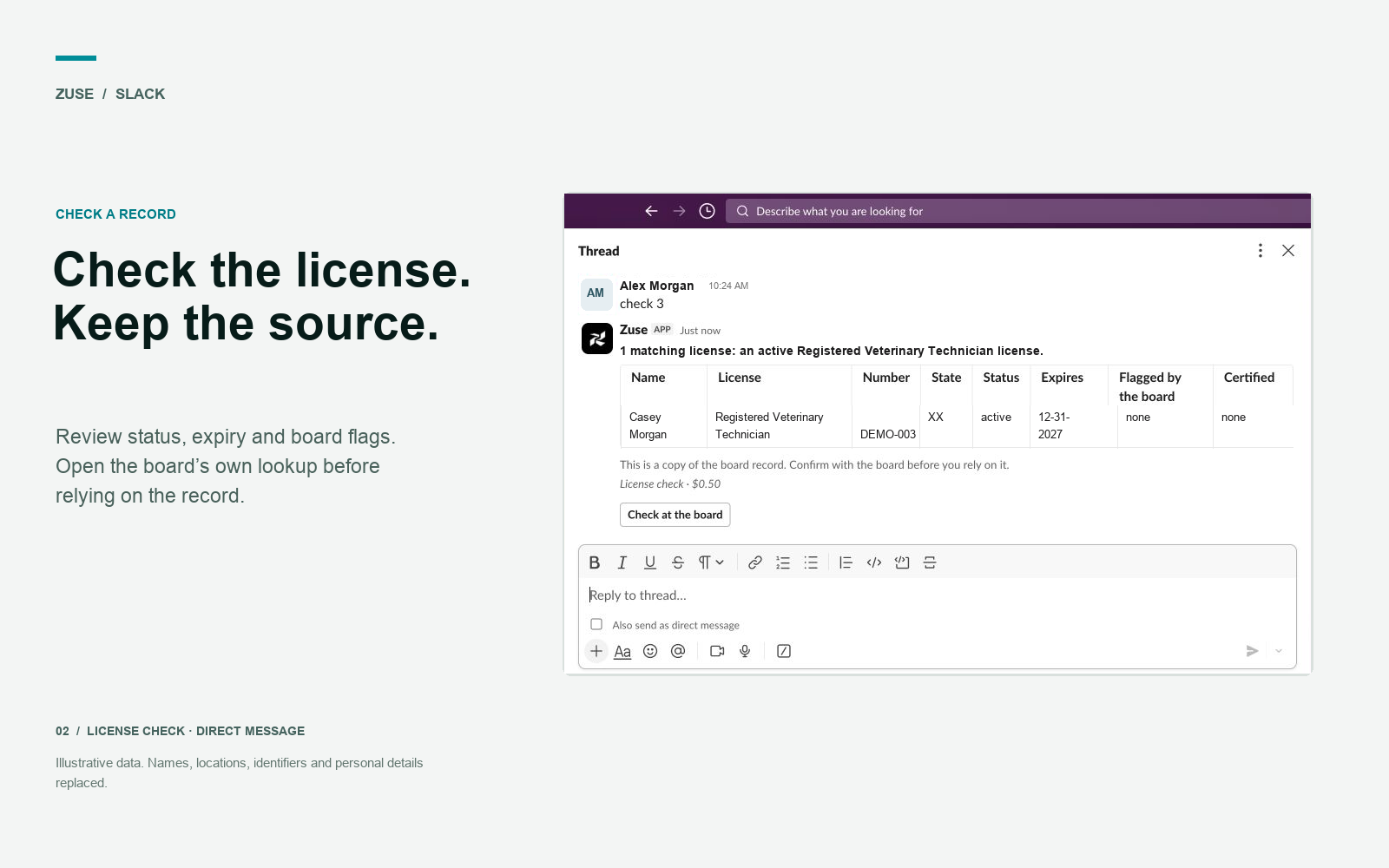
Background and intro notes on one person
Reply in the thread with a row number. Only you see the answer.
intro 1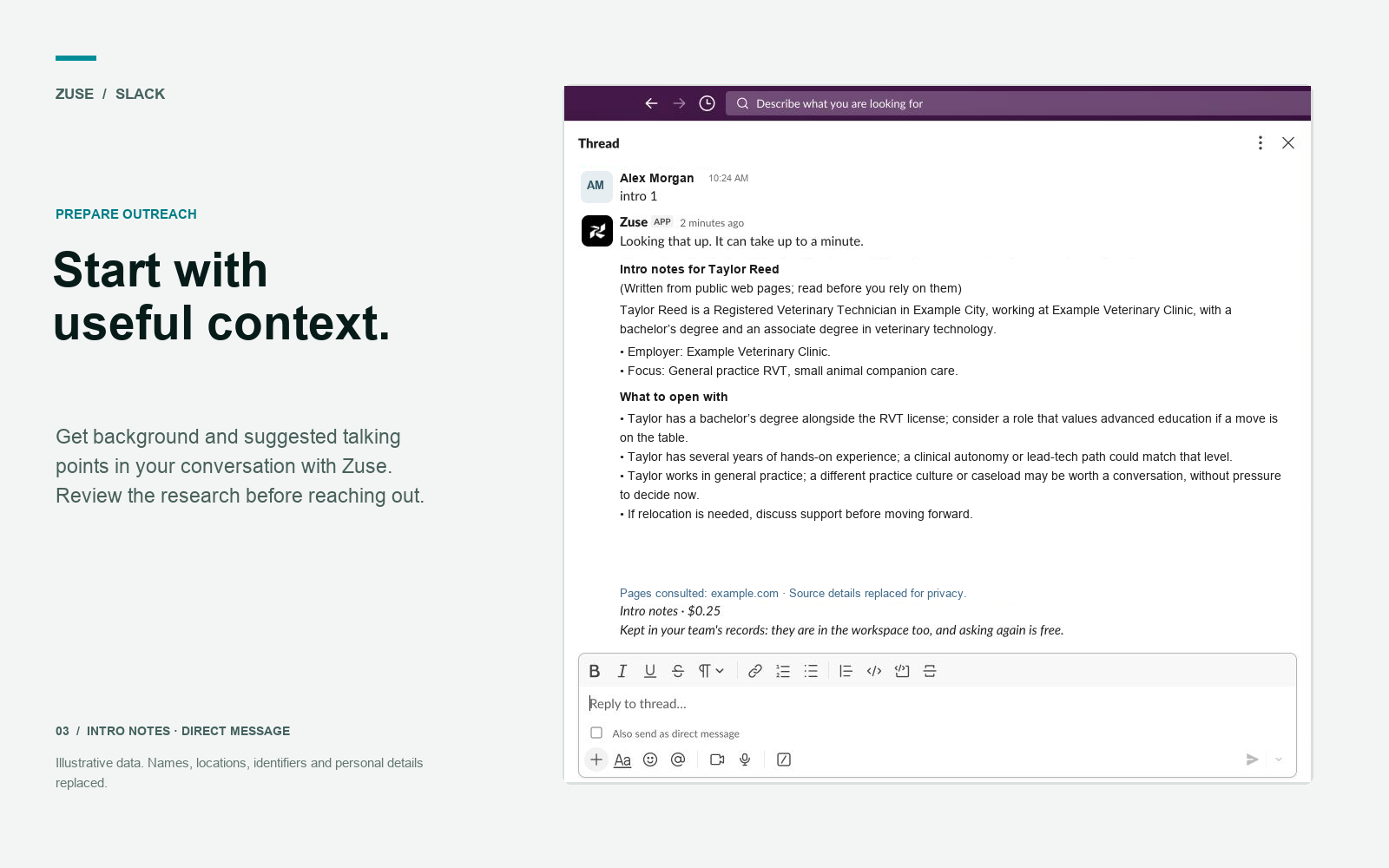
Groomers, front desk and kennel staff
No board licenses these roles, so Zuse finds them on their own public profiles near the ZIP code. Each person's job title shows the role in animal care, and people with veterinary experience come first.
@Zuse nearby 85281 groomersEmail and phone for one person
Reply with a row number, or name the person. Zuse asks People Data Labs, checks the answer against what it already knows, and shows every email and phone it found: personal, work, mobile and older ones. Only you see the answer.
contact 3
@Zuse contact Jane Doe, Tempe, AZ
Clinics near a place
Ask for clinics near a ZIP code, of any kind or one kind: emergency, specialty, mobile, shelter, equine, a specialty such as oncology, or a group such as VCA. The list comes from state boards' premises registers, clinics where practice managers were found to work, and OpenStreetMap, each clinic once.
@Zuse clinics 85004 emergency 10miReply research 2, or pick the clinic under the list, for who owns and runs it, the people its team page lists, and its phone, email, website and hours, from public web pages. Only you see the answer.
Your team's shortlist
Zuse in Slack and the workspace on the Zuse website are two screens over the same records. A workspace is one opening you are hiring for: the people you have shortlisted for it, and how far each has got. A shortlist made in Slack is in the workspace at once, and what a teammate does there is what Slack shows. Reading and changing these records costs nothing.
Create a workspace. Zuse answers with a button that opens a short form:
@Zuse new workspaceUnder any list of people, put some of them in it. Name the workspace, or leave it out when the thread is already about one or the team has only one open:
shortlist 1 3 4 to Night-shift RVTSee who is shortlisted, the stage each has reached, whether they have been emailed or have replied, and who added them:
@Zuse open Night-shift RVTMove someone along as things happen:
contacted 2Zuse says in the thread who made each change, so the team sees it, and the workspace records the same name.
Research is kept
Background and intro notes are saved on the person's record the first time anyone on your team runs them, in Slack or in the workspace. After that, asking again is answered from your team's records at no charge, and says when the research was done:
details 2details only ever reads what is on file. background 2 does the same when there is something on file, and runs the research when there is not. To run it again on purpose, and pay for it again:
refresh background 2Your team's records are yours. Another customer who looks up the same person starts from the license record and sees none of what your team found.
Keywords
Use these in a thread Zuse is in. They can follow an @Zuse mention or start the message directly:
| Keyword | Function |
|---|---|
more | Shows the next ten rows of the list. The same as pressing Next. |
background <number> | Background on the person in that row. Shown only to you. |
intro <number> | Intro notes on the person in that row. Shown only to you. |
contact <number> | Email and phone for the person in that row, from People Data Labs, cross-checked. Shown only to you. email and phone work too. |
check <number> | License check on the person in that row. |
clinics <ZIP> [kind] | Clinics near a ZIP code, of any kind or one kind, ten at a time. |
research <number> | After a list of clinics: who owns and works at the clinic in that row, and how to reach it, from public web pages. Shown only to you. research refresh 2 runs it again. |
balance | What is left of the team's credit. Shown only to you. |
history | The team's last ten requests: what was asked, what happened, and what it cost. Shown only to you. |
workspaces | The team's workspaces, with a button to create one. |
new workspace | A button that opens the form for a new workspace. With /zuse new workspace the form opens directly. |
open <workspace> | Who is shortlisted in a workspace: stage, outreach, what is on file, who added them. |
shortlist <numbers> | Puts those rows on a workspace's board. Add to <workspace> to say which. |
save <numbers> | Saves those rows for the team, on no board yet: the same as the save icon in Zuse. They show under People, Saved and on every opening. |
contacted <number> | Sets the stage. Also sourced, interview, offer, hired. |
remove <number> | Takes that person off the shortlist. What is on file about them is kept. |
saved | Everyone the team saved, and the boards each is on. The same list as People, Saved. |
shortlisted | Everyone on a board across the team's open workspaces, with stage. |
details <number> | What is already on file about that person. Never runs research. Shown only to you. |
refresh background <number> | Runs Background again and replaces what is on file. refresh intro and refresh contact do the same for intro notes and contact details. |
help | Shows usage instructions. |
A list is remembered in its thread for 24 hours. With a name in place of the number, the same keywords work anywhere: background Jane Doe, Los Angeles, CA.
How answers are written
The table is always built directly from the board record. The sentence above it is written by a language model (OpenAI) from the figures in that table, and every number in it is checked against them before it is posted; if a check fails, a plain sentence is used instead. The same model is what turns a question in your own words into one of the four things Zuse does.
Background and intro notes are not passed to that model. Neither are replies in a thread that are not addressed to Zuse.
People who have asked Zuse to leave them out are not listed and cannot be researched, in Slack as everywhere else.
Permissions
The Zuse app for Slack requests the following scopes:
| Permission | Slack access | Why Zuse needs it |
|---|---|---|
app_mentions:read | View messages that directly mention @Zuse | Start a request when someone mentions Zuse in a channel or thread |
chat:write | Send messages as the Zuse app | Post answers and tables in the thread |
commands | Add the /zuse command | Run a request from any channel |
channels:history | View messages in public channels Zuse has been added to | Receive public-channel thread replies so follow-ups work without another mention |
groups:history | View messages in private channels Zuse has been added to | Receive private-channel thread replies so follow-ups work without another mention |
im:history | View messages in direct messages with Zuse | Receive DM requests and follow-up replies |
users:read | View people in the workspace | Record the name of the person who shortlists someone, changes a stage or creates a workspace |
Zuse reads one thing with users:read: the name of the person who made a change, so the record can say who it was. It does not read the member list, email addresses or profiles. A workspace connected before this permission was added keeps working without it, and records "someone in Slack" until it is connected again.
Zuse only receives messages from channels it has been explicitly invited to and from its own DMs. Of those, it reads only replies in threads it has answered in, and it does not store them.
Pricing
Requests from Slack are billed to the Zuse team that connected the workspace, at the usual prices. See Pricing and metering.
Each answer ends with what it cost and how much credit is left. A page of ten on a Nearby list or a list of clinics is one request at $0.20, and so is each Next. Clinic research is $0.50 when the clinic is found. Pressing an old Next button again does not charge twice. Requests show in the console's usage page under the Slack channel, and the team's rate limits apply.
Disconnecting
An owner or admin can disconnect from Management > Zuse in Slack. Removing the Zuse app from the Slack workspace disconnects it as well. One Slack workspace connects to one Zuse team; to move it, disconnect first.
Privacy
Zuse stores the Slack workspace's id and name, an access token for it (encrypted), the list last shown in each thread for 24 hours, and the Slack member id of each person it has welcomed, so no one is welcomed twice. It does not store your messages. When someone shortlists a person, changes a stage, creates a workspace or runs research from Slack, that change is saved in your team's records with the name of the person who made it. For details on how Zuse handles your data, see the Privacy policy.